In the previous example I showed how to parse an xml that is stored in a file in res/xml folder.
In this post I will show you how to parse an xml that is stored in a server in an xml file.
Here I am using an xml that is stored in here
Here is the java code for that.
First create a fresh project and name it ParseXMLDemo
Then in the ParseXMLDemo.java file copy this code
package com.coderzheaven.pack;

import java.util.ArrayList;
import java.util.HashMap;
import org.w3c.dom.Document;
import org.w3c.dom.Element;
import org.w3c.dom.NodeList;
import android.app.ListActivity;
import android.os.Bundle;
import android.view.View;
import android.widget.AdapterView;
import android.widget.ListAdapter;
import android.widget.ListView;
import android.widget.SimpleAdapter;
import android.widget.Toast;
import android.widget.AdapterView.OnItemClickListener;

public class ParseXMLDemo extends ListActivity {
    @Override
    public void onCreate(Bundle savedInstanceState) {
        super.onCreate(savedInstanceState);
        setContentView(R.layout.main);

        ArrayList<HashMap<String, String>> mylist = new ArrayList<HashMap<String, String>>();

        String xml = ParseXMLMethods.getXML();
        Document doc = ParseXMLMethods.XMLfromString(xml);

        int numResults = ParseXMLMethods.numResults(doc);

        if((numResults <= 0)){
        	Toast.makeText(ParseXMLDemo.this, "There is no data in the xml file", Toast.LENGTH_LONG).show();
        	finish();
        }

		NodeList children = doc.getElementsByTagName("os");

		for (int i = 0; i < children.getLength(); i++) {
			HashMap<String, String> map = new HashMap<String, String>();
			Element e = (Element)children.item(i);
			map.put("id", ParseXMLMethods.getValue(e, "id"));
        	map.put("name", ParseXMLMethods.getValue(e, "name"));
        	map.put("site", ParseXMLMethods.getValue(e, "site"));
        	mylist.add(map);
		}

        ListAdapter adapter = new SimpleAdapter(this, mylist , R.layout.list_layout,
                        new String[] { "name", "site" },
                        new int[] { R.id.title, R.id.subtitle});

        setListAdapter(adapter);

        final ListView lv = getListView();
        lv.setOnItemClickListener(new OnItemClickListener() {
        	public void onItemClick(AdapterView<?> parent, View view, int position, long id) {
        		@SuppressWarnings("unchecked")
				HashMap<String, String> o = (HashMap<String, String>) lv.getItemAtPosition(position);
        		Toast.makeText(ParseXMLDemo.this,o.get("name"), Toast.LENGTH_LONG).show();
			}
		});
    }
}
Now create another java file inside the src folder and name it ParseXMLMethods.java and copy this contents into it.
package com.coderzheaven.pack;

import java.io.IOException;
import java.io.StringReader;
import javax.xml.parsers.DocumentBuilder;
import javax.xml.parsers.DocumentBuilderFactory;
import javax.xml.parsers.ParserConfigurationException;
import org.apache.http.HttpEntity;
import org.apache.http.HttpResponse;
import org.apache.http.client.methods.HttpPost;
import org.apache.http.impl.client.DefaultHttpClient;
import org.apache.http.util.EntityUtils;
import org.w3c.dom.Document;
import org.w3c.dom.Element;
import org.w3c.dom.Node;
import org.w3c.dom.NodeList;
import org.xml.sax.InputSource;
import org.xml.sax.SAXException;


public class ParseXMLMethods {

	public final static Document XMLfromString(String xml){

		Document doc = null;

		DocumentBuilderFactory dbf = DocumentBuilderFactory.newInstance();
        try {

			DocumentBuilder db = dbf.newDocumentBuilder();

			InputSource is = new InputSource();
	        is.setCharacterStream(new StringReader(xml));
	        doc = db.parse(is);

		} catch (ParserConfigurationException e) {
			System.out.println("XML parse error: " + e.getMessage());
			return null;
		} catch (SAXException e) {
			System.out.println("Wrong XML file structure: " + e.getMessage());
            return null;
		} catch (IOException e) {
			System.out.println("I/O exeption: " + e.getMessage());
			return null;
		}
        return doc;
	}

	 public final static String getElementValue( Node elem ) {
	     Node kid;
	     if( elem != null){
	         if (elem.hasChildNodes()){
	             for( kid = elem.getFirstChild(); kid != null; kid = kid.getNextSibling() ){
	                 if( kid.getNodeType() == Node.TEXT_NODE  ){
	                     return kid.getNodeValue();
	                 }
	             }
	         }
	     }
	     return "";
	 }

	 public static String getXML(){
			String line = null;

			try {

				DefaultHttpClient httpClient = new DefaultHttpClient();
				HttpPost httpPost = new HttpPost("http://coderzheaven.com/xml/test.xml");

				HttpResponse httpResponse = httpClient.execute(httpPost);
				HttpEntity httpEntity = httpResponse.getEntity();
				line = EntityUtils.toString(httpEntity);

			} catch (Exception e) {
				line = "Internet Connection Error >> " + e.getMessage();
			}
			return line;
	}

	public static int numResults(Document doc){
		Node results = doc.getDocumentElement();
		int res = -1;
		try{
			res = Integer.valueOf(results.getAttributes().getNamedItem("count").getNodeValue());
		}catch(Exception e ){
			res = -1;
		}
		return res;
	}

	public static String getValue(Element item, String str) {
		NodeList n = item.getElementsByTagName(str);
		return ParseXMLMethods.getElementValue(n.item(0));
	}
}
Now the main layout file main.xml
<LinearLayout xmlns:android="http://schemas.android.com/apk/res/android"
    android:orientation="vertical"
    android:layout_width="fill_parent"
    android:layout_height="fill_parent">

    <ListView
	 	android:id="@id/android:list"
	    android:layout_width="fill_parent"
	    android:layout_height="wrap_content"
	    android:layout_weight="1"
	    android:background="#FF0000"
	 	android:drawSelectorOnTop="false" />
</LinearLayout>
Create another file named list_layout.xml inside the layout folder and copy this code into it.
<?xml version="1.0" encoding="utf-8"?>
<LinearLayout xmlns:android="http://schemas.android.com/apk/res/android"
    android:orientation="vertical"
    android:layout_width="fill_parent"
    android:layout_height="fill_parent"
    android:padding="7dp"
    >
<TextView
	android:id="@+id/title"
    android:layout_width="fill_parent"
    android:layout_height="wrap_content"
    android:textAppearance="?android:attr/textAppearanceMedium"
    android:padding="2dp"
    android:textSize="20dp"
    android:textStyle="bold"
    />
    <TextView
	android:id="@+id/subtitle"
    android:layout_width="fill_parent"
    android:layout_height="wrap_content"
    android:padding="2dp"
    android:textSize="14dp"
    android:textColor="#000000" />
</LinearLayout>
This is the Strings.xml file
<?xml version="1.0" encoding="utf-8"?>
<resources>
    <string name="hello">Hello World, ParseXMLDemo!</string>
    <string name="app_name">ParseXMLDemo Coderzheaven.com</string>
</resources>
Now you are done go on and run the application.
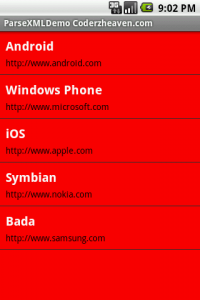
Get the full source code from here and don’t forget to comment on this post.